Wi-Fi Studio by The WiFi ConnectionAlready have an account? Sign in ↗
Free download · Wi-Fi Studio for Mac

Wi-Fi Studio Inspect, free.

See every nearby Wi-Fi network, the channels they use and how strong they are, with live diagnostics for the network you're on.

Get Inspect for Mac

Tell us a little about you and we'll set up your free account.

Enter Independent if you work for yourself.

We'll email you about Wi-Fi Studio updates and new features. You can unsubscribe at any time. See our Privacy Notice.

We use these details to create your free Inspect account, send you the download and sign-in links, and keep a record of who downloads Wi-Fi Studio. The WiFi Connection is a trading name of The Connection Group LTD. See the Privacy Notice of The Connection Group LTD.

✓

Your download is ready

Your free Inspect account is ready.

Download Wi-Fi Studio for Mac
  1. Open the downloaded file and drag Wi-Fi Studio to Applications.
  2. Open Wi-Fi Studio and sign in with .
  3. Allow Location when macOS asks, so the app can show network names.
See the Wi-Fi around you

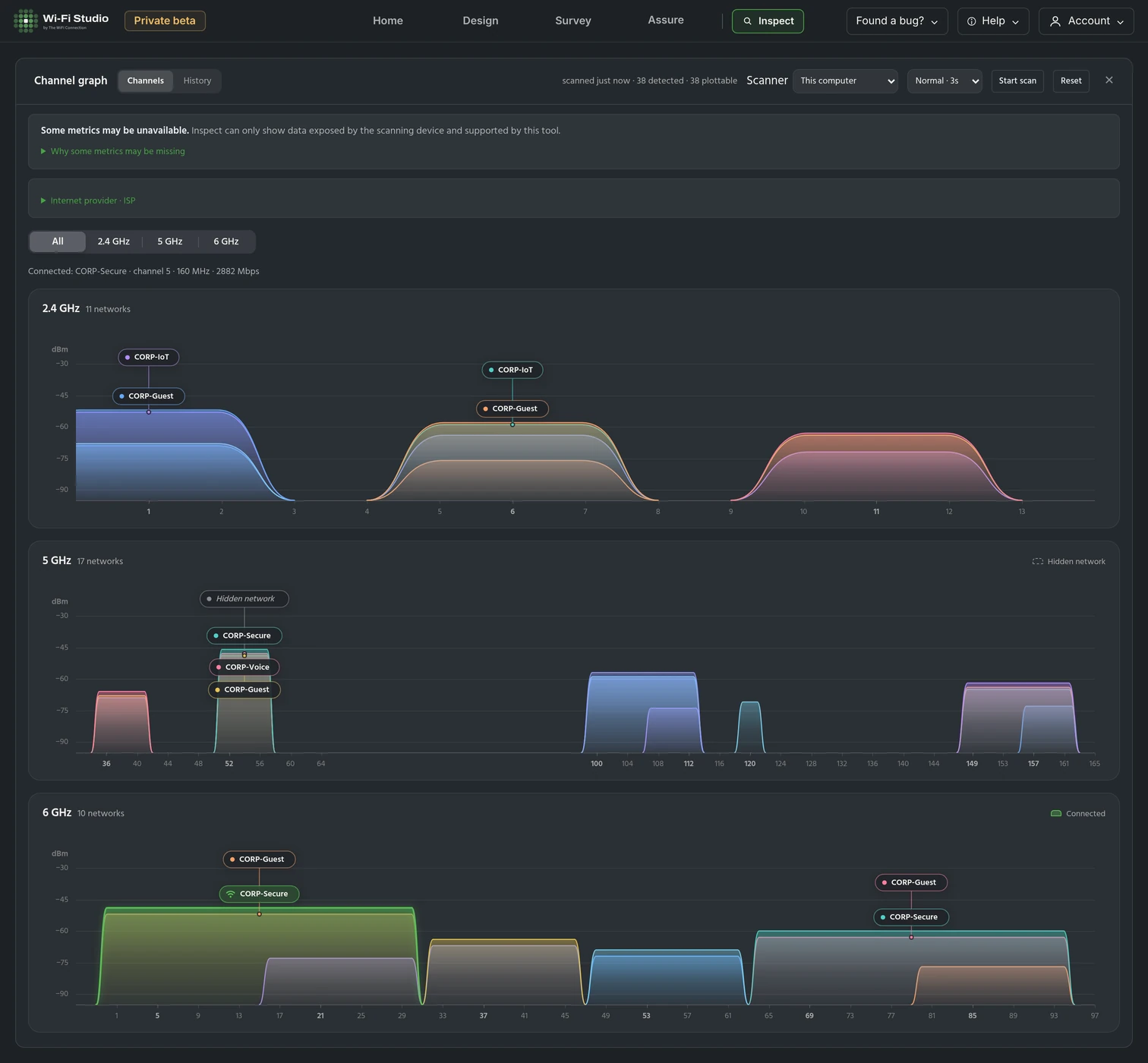
Inspect lists every network your Mac can see and draws it on a channel graph for 2.4, 5 and 6 GHz, so you can tell at a glance which channels are busy and how strong each network is.

Wi-Fi Studio Inspect on a Mac: the channel graph for an office floor, with separate 2.4 GHz, 5 GHz and 6 GHz graphs showing where each nearby network sits and how strong it is.
The channel graph shows every nearby network on 2.4, 5 and 6 GHz, by channel, width and signal strength.
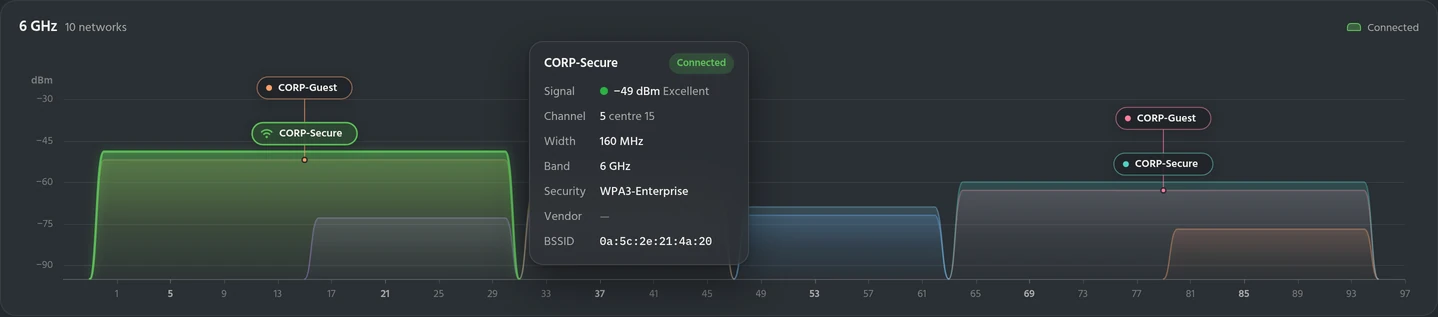
Inspect's 6 GHz channel graph with the details card for the connected network: CORP-Secure, −49 dBm (Excellent), channel 5 with centre 15, 160 MHz wide, 6 GHz, WPA3-Enterprise.
Hover over a network to see its signal, channel, width, band, security and BSSID.
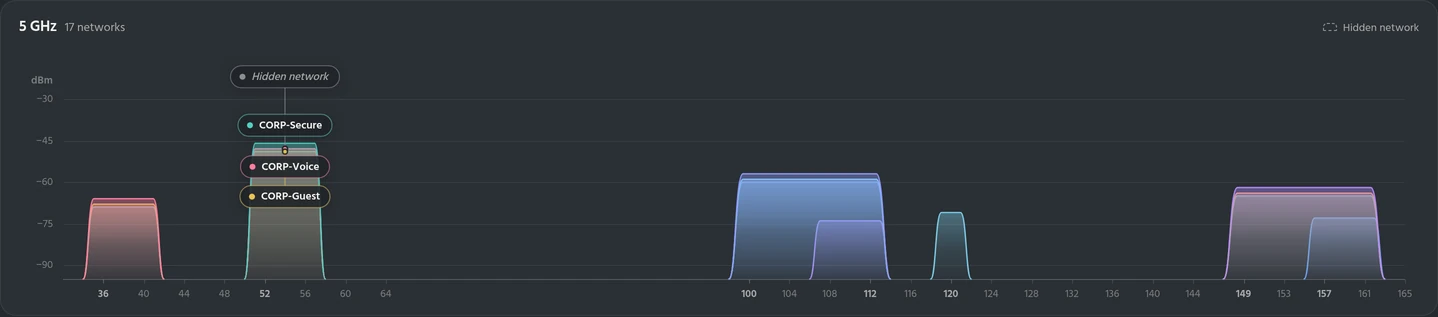
Inspect's 5 GHz channel graph: 17 networks on channels 36 to 157 at 20, 40 and 80 MHz, the strongest at −46 dBm on channel 52.
Filter by band to see 2.4, 5 or 6 GHz on its own.
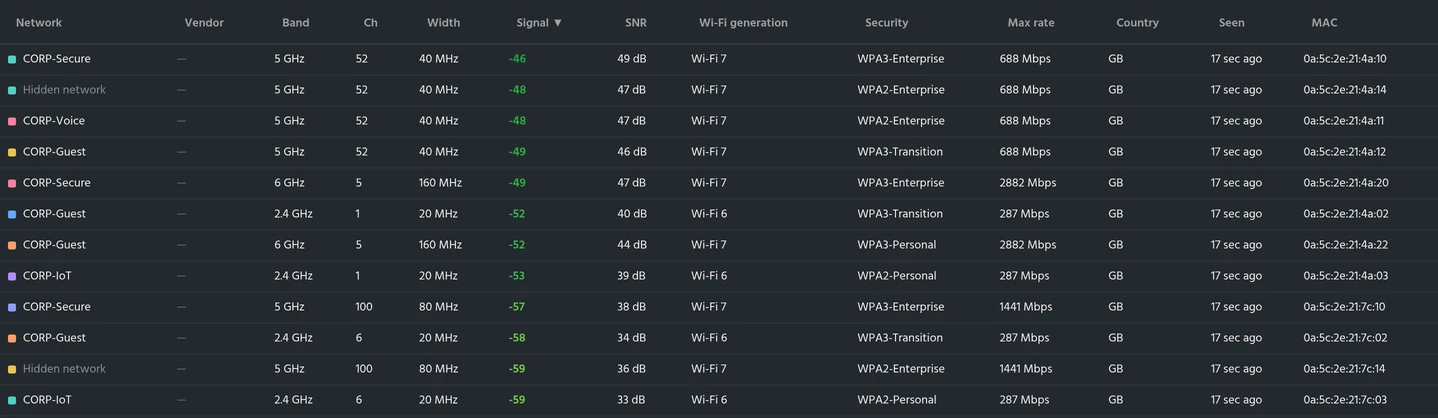
Inspect's networks table, sorted by signal, with band, channel, width, signal, SNR, Wi-Fi generation, security, max rate, country, last seen and MAC address for each network across 2.4, 5 and 6 GHz.
The networks table lists each network's band, channel, width, signal, SNR, Wi-Fi generation and security.

Screenshots show Wi-Fi Studio Inspect with example data from an office floor.